
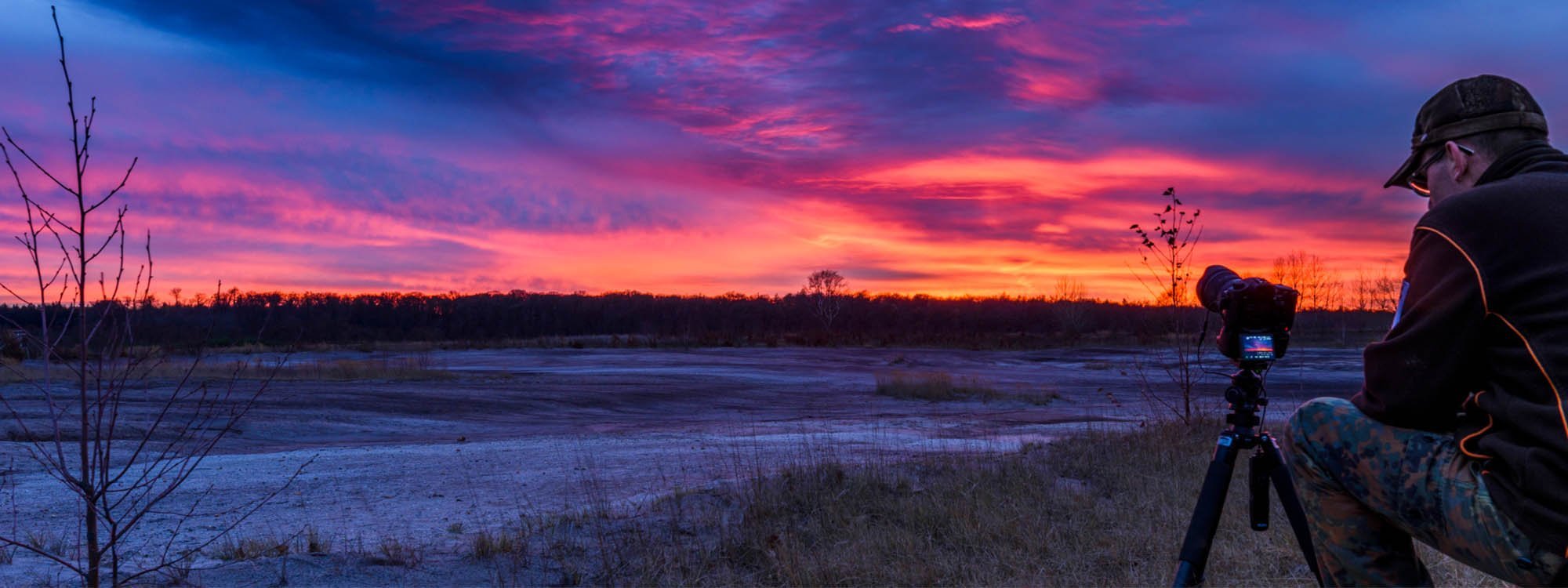
Slowly, almost imperceptibly, clouds drift across the sky, and the sun descends for its final touchdown until darkness slowly sets in. This is how beautiful sunsets unfold, or something similar. Pictures of them capture the moment, but they cannot reflect the entire spectacle. A video documenting the sunset would show it in its full glory, but hardly anyone would watch a two-hour video of a sunset.
So, how can you document the event in such a way that the entire spectacle can be replayed within a few seconds? The answer is obvious: with a time-lapse. They shorten the time a process takes to a minimum by deliberately omitting many individual frames of a scene and/or playing them back at high speed, and that's exactly what we're going to talk about now.
General Information on Time-Lapse Photography
First, it's essential to understand how time-lapse photography works. A time-lapse is essentially nothing more than a fast-played slideshow of a scene that changes over time.
Time-Lapse Procedure
There are two different principles for creating a time-lapse. The first method is the simplest: you film a process and then simply play the resulting video at a much higher speed. This becomes problematic if you run a time-lapse over an enormously long period. The video data would be so large that storage space issues could arise.
The second and much better option is to create individual frames at specific intervals, which are then assembled into a video. Many cameras and even smartphones can do this now. They take pictures at certain time intervals and then automatically combine them into a time-lapse video. This makes it quite easy to create a time-lapse without much effort. However, if you want to maintain control over each individual image and work according to your own ideas when assembling the individual images, that is also possible and, in doubt, the better choice. It will involve some work, but the result will be impressive.
Optimal Intervals for Time-Lapse Shots
First, you should make sure that the camera takes individual pictures. Many cameras have an integrated intervalometer . If this is not the case, you can often add one in the form of cable releases with an interval function. This intervalometer allows you to set how many seconds elapse between the individual pictures your camera takes.
As is often the case, there is no single optimal interval. However, to provide a rough guideline, for a sunset, you should choose an interval of three to five seconds. This means the camera takes a picture every three to five seconds. The interval must, of course, always be constant. Fast-moving clouds should be photographed with an interval of two to three seconds. A little experimentation is, of course, unavoidable.
Shutter Speeds in Time-Lapses
The shutter speed should also be chosen to match the interval. But first, I want to describe a negative example for clarification:
If the clouds are moving very fast in the sky and you have chosen an interval of three seconds, everything is perfect so far. But now you come to setting up the camera. The sun is shining and it is very bright, so you choose a shutter speed of 1/500 seconds. This shutter speed is so short that it freezes the clouds in their movement. However, there are still almost three seconds until the next picture, during which the clouds continue to move. The second picture is taken. Again, the clouds are frozen in their movement, and again, there are still almost three seconds until the next picture. In short, you always have a gap of almost three seconds in which the clouds have suddenly moved further. This will appear too jerky in the final time-lapse, as the movements from picture to picture will have gaps and thus look very abrupt.
If you try to increase the shutter speed to 1.5 seconds in the same example, which can be done by stopping down, changing the ISO settings, or using an ND filter , then you will capture the cloud movement in those 1.5 seconds in your photo, and the jump to the next image is only 1.5 seconds away. This will result in smaller gaps between the images and a smoother overall effect.
Therefore, you should make sure that at least approximately half of the interval is set as the camera's shutter speed. For very short intervals, it is crucial to note that the camera needs some time to save the images. Many saving processes are too long for a very short interval to be possible at all. If you consider all of this, you will have created the optimal basic conditions for a great time-lapse.
Choice of Playback Speed
Once the photos are taken, software such as Lightroom, LRTimelapse, or Adobe Premiere Pro should be used to assemble the individual images to create the finished film. It's important to remember that a video is simply a sequence of rapidly assembled individual images played back at a specific speed.
Common video playback rates or framerates, as they are called, are 24 fps (frames per second), 30fps, 60fps, and various intermediate levels. The generated photos should then be played back at such a speed to create a film. It is important to know that from a refresh rate of 20 frames per second, the human eye perceives a film as fluid. So, if you play the generated images at 10 frames per second, the video will be very jerky and unsightly.
Camera Wear and Framerate
Those who paid attention will have noticed that the production of time-lapses with individual images puts a lot of strain on the shutter of a DSLR camera, as the number of pictures taken for a film is enormous. Therefore, it is advisable to use a mirrorless camera.
If you still use a DSLR camera, you should consider the outcome in advance. Especially regarding the framerate at which you want to play the video. It makes sense to use a low framerate of, for example, 24 fps, as the video will already be perceived as smooth, and only 24 individual frames are needed for one second of finished time-lapse. If you want to play it at 60 fps, however, you have to take 60 photos for one second of finished time-lapse.

Equipment for Appealing Time-Lapse Shots
You don't need much for a simple time-lapse. It's sufficient to have a camera with a lens, a separate intervalometer – if it's not integrated into the camera – and a stable tripod. If you have these pieces of equipment at hand, you can already produce very high-quality time-lapses.
In addition, for a special look, you can use motorized camera sliders that provide additional movement or camera guidance during the time-lapse. These sliders can also be combined with 360° panoramic heads, which are also motorized, leading to very impressive results.
It is also useful if the camera can be connected to a mobile phone to achieve the best possible transition between day and night in day-to-night time-lapses. An app like QDSLR Dashboard regularly interprets the histogram and adjusts the camera's shutter speed as soon as the darkness falls below a certain reference value. The finished result will be very impressive, as long as everything goes well.
In the beginning, however, you might prefer to stick to the basic equipment. Too many cooks can spoil the broth in the initial phase, as you have too many parameters and variables to pay attention to at the same time. Therefore, you should first concentrate on being able to create time-lapses properly, as this will demand a lot from you. In my personal experience, it is also useful to create a checklist to ensure that nothing is left at home. With basic equipment, this might seem a bit silly, but at the latest when sliders and the like are used, this is an enormous help.

Location and Composition
The most important thing for a time-lapse is the choice of location and the correct composition. Because you cannot change this once you have started the time-lapse. Therefore, I recommend spending more time searching for the location and the right image section, rather than regretting the unfavorably chosen image section later. You should also definitely avoid taking photos in portrait format, as it is tedious to tilt the TV on its side afterwards to view the video in its full glory.
When choosing the frame, you should ensure that something in the image changes if possible, otherwise the time-lapse could become very boring. Moving clouds, a sunrise or sunset, a busy intersection or flowing water are just a few examples of changing or moving subjects that are excellently suited for a time-lapse.
When taking individual photos and ultimately creating a video from them, it's good to note that the most common video format is 16:9, whereas most cameras take photos in 4:3 format. This means that at least some height will be lost from the images. Here, video mode can help if the format cannot be changed in the camera: you set video mode, and then the camera's live view shows a 16:9 section, which you can use to choose your composition. You then fix the camera accordingly with the tripod head and ideally don't change anything else. You then simply switch from video mode back to photo mode and can start shooting.
Time-lapse Settings
The camera should be manually set to prevent the camera's parameters from changing when light conditions fluctuate. An exception is day-to-night time-lapses, where the camera needs to be continuously readjusted, as briefly described above.
Optimal focus should be set on the scene, and then autofocus should be switched off to prevent it from trying to focus during the photos. This would usually look very unsightly and could ruin the entire footage. Also, switch off any stabilizers.
As already mentioned, choose the exposure so that it is ideally half as long as the interval. The use of ND filters can be very helpful here. However, you should make sure to keep the viewfinder cover closed during longer shutter speeds to avoid unsightly purple discolorations in the center of the image.
In cases of high contrast, one should not shy away from using graduated filters. In principle, other settings and variables are made as in landscape photography, i.e., a closed aperture and a low ISO. For optimal post-processing, you should always work in RAW format, as this gives you the best opportunities to make changes in the highlights and shadows of the images.
Post-processing the Photos
If you're working with individual images, you can't avoid assembling the photos on a PC. With the help of suitable software , the images are arranged chronologically and uniformly edited beforehand, so that the result has the look you want to bring into the video.
Subsequently, the finished time-lapse is saved as a video, so you can watch your work for the first time "in fluid form". There are various ways to assemble a time-lapse. Whether freeware or paid programs are used is up to each individual. I have had very good experiences with the combination of LRTimelapse and Lightroom , which is why I can wholeheartedly recommend them to everyone.
Day to Night and Moving Time-Lapses
In addition to simple time-lapses, there are also more complex methods to present events more interestingly. Adding extra movement to the time-lapse, for example, is a frequently used effect. Slow-motion camera movements combined with fast-moving clouds, for instance, create a great contrast in the video that is simply captivating.
What was almost impossible for a long time is the creation of a time-lapse from daylight to absolute darkness, which is why the name Holy Grail has become established for the impossibility of these recordings.
The reason for this is quite simple: the rapidly changing light. To see anything in the pictures from daylight to night, you are forced to regularly readjust the camera settings. The darker it gets, the longer the shutter speed must be, a higher ISO must be set, or the aperture must be opened further. This means that with every change in the camera values, the video will show a clear change, becoming abruptly either brighter or darker. However, with the help of a program such as LRTimelapse, it is possible to smooth out these light jumps , so that a uniform video is created in the end.

QDSLR Dashboard
During the transition from day to night, one is forced to constantly readjust the camera's parameters to keep the image brightness as constant as possible. This means spending a while hunched over the camera, turning dials, which can be very annoying.
Furthermore, there is a risk of blurring the camera when changing camera settings. However, since almost everyone now has a smartphone or even a tablet, this workflow can be automated. The QDSLR Dashboard app can take control of the camera. To do this, you need to connect your phone or tablet to the camera via Wi-Fi or a cable, set the camera to JPG and RAW, and you're good to go.
The app is now able to interpret the image histogram using reference values, based on the JPG preview shown on the mobile device after each shot. Over the course of the day, the brightness in the image will change, and the image will, for example, become darker. The app ensures that the camera's values are adjusted again so that the histogram is balanced, until the image becomes too dark again and the app becomes active again.

Time-Lapse with Egg Timer Method
Some movements can be created with very simple household items. For example, if you place your camera on an egg timer and have the camera shoot pictures at intervals while the egg timer rotates, you will have created a moving time-lapse with simple means.
The quality of the camera rotation then depends on the uniformity of the egg timer. However, the egg timer method presents potential problems. For example, you can usually only run a time-lapse for a maximum of one hour (the normal running time of an egg timer), which of course doesn't work for longer projects. Large cameras are also usually too heavy for an egg timer to bear. Furthermore, the timer often rotates continuously, which is suboptimal for longer shutter speeds, as images will generally be blurred with such exposure times.
However, there is a solution to these problems: Motorized and programmable camera sliders and 360° panoramic heads that can also be mounted on the slider offer the possibility to bypass all these problems and add movement to the video as desired.

Sliders for custom camera movements
The slider is a rail with a pre-mounted carriage on which the camera can move back and forth. Ideally, this happens smoothly and often via a belt stretched between the beginning and end of the slider.
Sliders should above all be motorized and programmable for time-lapse. The motor ensures that the camera is moved evenly across the carriage during recording and not jerkily or continuously. The motor stops for each shot to ensure that the shot is not blurred. After the shot, the camera is moved a little further to take the next photo. Since these travel intervals are only a few millimeters to centimeters, it would be very inconvenient to do this manually.
Sliders are available in various designs, materials, and lengths, and of course in various price ranges. I personally always rely on carbon, as the weight saving is very important to me, because in addition to the slider, a lot of material has to be transported to the shooting location.
360° Panoramic Head
If the slider becomes too boring in the long run and one axis is not enough for a camera movement, you can either place an egg timer on the slider (with the problems already described) or use a motorized panoramic head.
With a panoramic head, you can incorporate a 360° rotation around the horizontal and/or vertical axis into your time-lapse, which really rocks. Like the slider's motor, the head should be programmable. In combination, the head and slider function as one unit, so you only have one controller in which you program the movement. Especially for time-lapses where you want to track the Milky Way or the sun with the camera, a 360° panoramic head is ideally suited.
Image composition for moving time-lapses
For moving time-lapses, you should pay even more attention to image composition. To make the movement visible, you need a foreground that shifts against the background. The closer the foreground is to the camera, the more visible the movement will be.
Conclusion on time-lapse photography
With time-lapse photography, you can achieve spectacular results and open up whole new possibilities. Your imagination knows no bounds. Play with different motifs and image compositions. Practice makes perfect!
We would love to hear about your experiences, insider tips – and especially great examples of your previous work! Share your experiences with us on Facebook or Instagram !
Share:
Learn Macro Photography: The Complete Guide for a Quick Start
Italy in Autumn – with camera and tripod on the Riviera, in Rome, and on Capri
1 comment
an und für sich…..
ein interessanter Artikel ???
Doch was sollen die fünf Video’s, die auf Privat Gestellt…
Hat da Rollei keine Rechte dazu….
Da sollte man sowas entfernen, denn Hilfreich ist das nicht wirklich.