
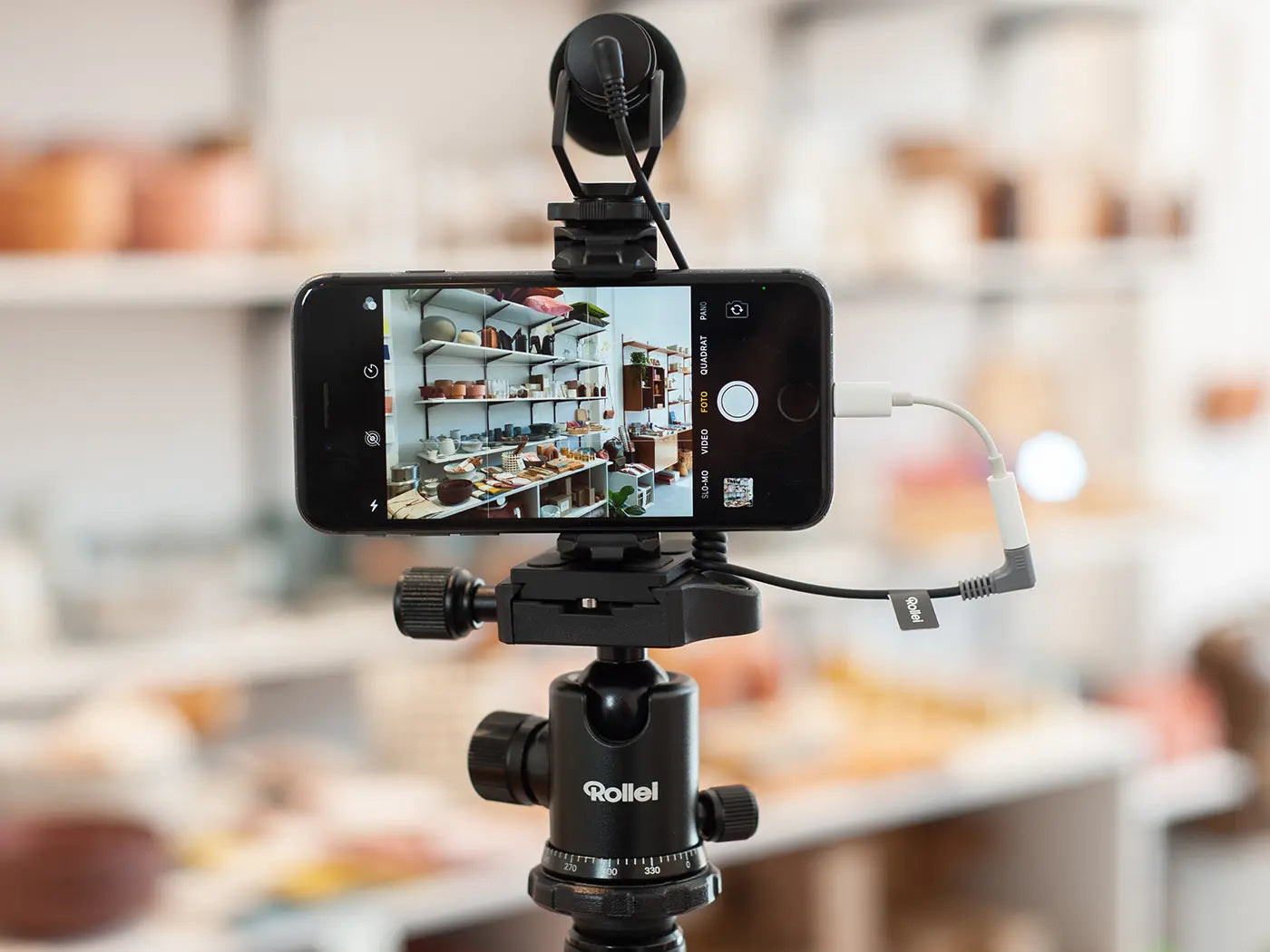
The general consumption of videos has increased rapidly in recent years. A development that motivates smartphone manufacturers to regularly outdo each other with new technical standards. HDR, 8K, optical zoom, optical image stabilization, telephoto and ultra-wide-angle lenses are just some of the latest trends.
Due to technological advancements, more and more videographers and vloggers are now using their phones to produce high-quality content. Even Hollywood is already working with them: As early as 2018, director Steven Soderbergh ("Ocean's 11", "Solaris") shot his film "Unsane" entirely with a mobile phone. "High Flying Bird" followed as his second film in 2019.
However, the new features are particularly interesting for video beginners, as they offer the chance to produce videos at a professional level even with basic knowledge. For example, for their own social media channels or a website. It is important to note that a good mobile phone camera alone - and this also applies to cameras in the high-priced professional segment - does not yet make a good video. For a video to be suitable for professional use, good planning of the project is required. This also includes the appropriate technical equipment. Fortunately, the possibilities here have not only become more diverse, but also more powerful and affordable. In the following, we will take an overview of what equipment or tools are available and what generally needs to be considered.

The right tripod
A professional video must, of course, not be shaky. Therefore, a tripod is part of the basic equipment. Before buying, you should first ask yourself what and where you want to film. For static shots without camera movements, a simple tripod, like the Compact Traveler No.1, is usually sufficient.
If, for example, you plan to pan the camera to film a larger room or a landscape, you should use a video tripod with a pan arm.
Videographers who are mainly on the go outdoors and want to remain spontaneous should consider a compact tripod. This can also be stored in a backpack together with the phone and is thus quickly ready for use. In addition, a tripod like the Comfort Vlogging Kit can also be used to film with just one hand.

Mounting or accessory rail
For filming with a smartphone, mounts or accessory rails are basically indispensable. With them, the smartphone can be attached not only to tripods, but also to pretty much anything else a standard camera can be attached to. In addition, you have the option of connecting other equipment such as lights or microphones to the smartphone.
The lighting situation during the shoot
Light is always a particular challenge when filming. Despite all progress, mobile phone cameras still have a fairly small camera sensor due to their small size. This means that they cannot capture much light, and thus an environment can appear darker in the recording than it is subjectively perceived by the human eye, for example. Many mobile phone cameras therefore compensate for a lack of light by digitally adjusting the brightness. However, this usually leads to significant cuts in image quality due to image noise.
If available, sunlight can be used well. However, this can change significantly in the short and long term if, for example, you film over a longer period. This can be disturbing in the video later if it is not part of the dramaturgy. Other electrical light sources can also be used in part, but it makes sense to be able to regulate yourself how much light emanates from a light source and also whether it should be more yellow or white, or warm or cold.

Before buying, you should therefore in any case consider the lighting situation during the shoot and ask yourself exactly what needs to be illuminated. This decides on the quantity as well as the size of the lights required. For detail shots where the camera is placed close to the object or person, small LED lights that can be attached directly to the smartphone via a mount may suffice.
If, for example, you want to film one or two people or need to keep a little more distance from the object to be filmed, something larger or brighter is needed. Recently, for example, foldable LED panels offer a lot of light with a comparatively small footprint. It is particularly practical that these can also be easily attached and aligned to other objects with clamps without using a tripod. They can also be operated with batteries without a power outlet.
To make existing light softer or to diffuse it, you should also have a suitable softbox or a reflector.

Choosing the right microphone
Good audio is and remains half the battle in any video. Here, too, the question of the situation and environment in which the filming will take place should be clarified.
For interviews or even moving protagonists, a so-called lavalier microphone is recommended. These are small microphones that can be attached, for example, to the collar of one or more people. For this, you need appropriate wireless microphones.
Shotgun microphones are an alternative if, for example, you don't want a lavalier in the shot or want to record spontaneous interviews. They can be attached to the tripod or via mounts on the smartphone and connected directly to it via appropriate cables. As the name suggests, they pick up the sound of the object they are pointed at. The size of the microphone should be adjusted according to the distance between the sound source and the microphone. Unlike lavalier microphones, ambient noise is also recorded. In environments with a lot of wind, a windshield should therefore also be used.

Shake-free videos with the Gimbal
One of the absolute highlights in smartphone videography in recent years are gimbals. The smartphone can be easily and quickly attached to them, and several built-in motors magically ensure that movements when walking, running, or panning the camera are automatically dampened. This makes it easy to create beautiful, shake-free handheld shots. They can be stored in a space-saving way and can also be used as a tripod thanks to a stand. In addition to shake-free videos, they now also make it easy to create creative video material such as moving time-lapse shots or so-called hyperlapses.
Tip: If you're filming specifically for channels like Instagram, you can quickly switch to a vertical mode and film vertically, filling the entire screen.
Helpful apps for smartphones
Camera Apps:
The camera apps supplied by the manufacturer not only deliver an excellent video image, but depending on the model, they also offer control over video settings and functions such as slow-motion recording. Nevertheless, it can be worthwhile to use special film apps. For example, the Filmic Pro app, specially developed for smartphone videography. With it, you can manually determine which areas in the image should be sharply displayed even while filming, which can be used as an aesthetic means to direct the viewer's attention. In addition, a depth of field can be simulated, which makes the background of an object or person appear blurred and thus separates it more strongly from the object or person. The ISO number can also be adjusted, which usually increases in darker lighting conditions and thus causes the aforementioned image noise. The video quality can also be maximized with special video profiles.
Video editing apps:Another fundamental advantage of smartphone videography is that the filmed material can also be edited and published directly on the smartphone using video editing apps. This allows very decent results to be achieved with just a few finger movements and, if necessary, even published or sent directly on the internet.
Conclusion
Even if smartphones cannot yet (still!) compete with video or full-frame cameras in many areas, they offer many possibilities for a very professional result for content that is primarily viewed on the smartphone itself. Appropriate accessories and helpful apps help to significantly increase the quality.
A crucial advantage of mobile phone filming remains the wisdom that the best camera is always the one you have with you anyway. And if you are able to achieve good filming results with your smartphone and know how to use essential tools, you can indeed achieve very good results.
Note: All videos shown were shot with an iPhone.

Share:
The F:X Pro Round Filter Set in use with Max Montella
Unique memories through a color powder shoot!